To make a wedding crossword puzzle, write 10–20 short clues about the couple, then use a wedding crossword puzzle maker to arrange the answers into a real interlocking grid you can print. In the Craft & Solve editor the whole thing takes one sitting: you build and preview the entire puzzle for free, and pay only when you're ready to download the print files.
Here's the exact process, click by click. The end result is a DIY wedding crossword for guests to solve at cocktail hour, at their dinner tables, or in their hotel rooms. No graph paper involved.
How to make a wedding crossword puzzle in 7 steps
1. Start with the wedding occasion
Go to app.craftandsolve.com/start and pick Wedding. That one choice pre-loads a wedding background design, a matching look, and starter content you'll replace with your own. You begin from a finished-looking puzzle instead of a blank page.
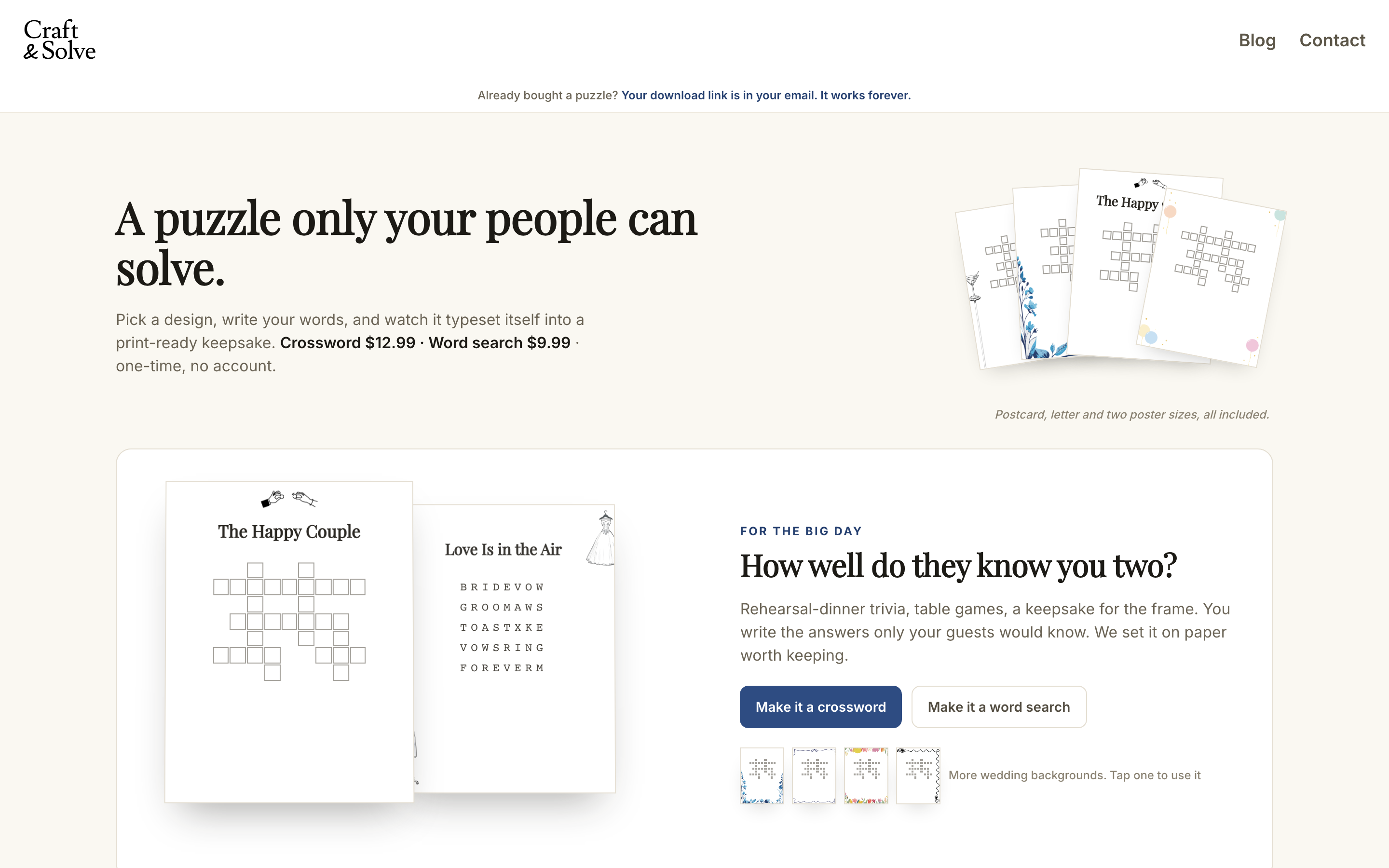
2. Add your words and clues
Open the words section and type each answer with its clue. This is the part guests will remember, so make the answers about the couple. A few copy-paste-ready examples to riff on (swap in your own answers):
- The city where it all started (CHICAGO)
- First-date food, still ordered weekly (TACOS)
- The month they said "I do" (OCTOBER)
- Where the proposal happened (BEACH)
- Honeymoon destination (HAWAII)
- The dog who thinks he's the best man (BISCUIT)
- Groom's go-to karaoke artist (QUEEN)
- Years from first date to wedding (FIVE)
Two mechanics tips. Keep answers between 3 and 10 letters, since short words interlock best. And write multi-word answers without spaces; crossword grids don't use them. If you want a full brainstorm list, we keep one in wedding crossword question ideas.
The editor works just as well on a phone. The controls slide up in a bottom sheet over the live preview, so you can build the clue list from the couch.

3. Let the grid rebuild itself
You never lay out the grid by hand. Every time you add or remove a word, the arrangement regenerates into a fresh interlocking grid with numbered clues. Don't like the shape? Regenerate until you get one you do. You can also flip the preview to show the solution letters while you sanity-check the fit — the printed puzzle itself is always blank, with the answers on a separate key.

4. Choose your style and background art
In the look section, set the fonts and colors, then pick a background design. There are 36 designs across occasions. For weddings that means everything from florals to simple classic borders to celestial, and the preview updates instantly so you can judge it against your invitation suite.

5. Check every print size
Use the size switcher on the preview to flip between the four print formats and see how your puzzle re-typesets at each one. You don't have to pick just one (the download includes all four), but it's worth checking that a long clue list still reads comfortably at the size you plan to print most.

6. Check out
When the preview looks right, hit the buy button. Checkout is a one-time $12.99 through Stripe's hosted payment page. No account to create, no subscription. Not finishing in one sitting? You can email yourself a draft link from the editor and pick up where you left off.
7. Get your PDF bundle by email
Your files arrive by email right after payment, along with a permanent download link. The bundle contains exactly:
- US Letter (8.5×11"), the standard printable page
- 5×7" card that fits welcome bags and place settings
- 18×24" poster
- 36×24" landscape poster for a giant communal grid
- An answer key
Every file is watermark-free and print-ready. Print the Letter and card sizes at home on cardstock; send the posters to any print shop. And if you spot a typo the morning after, you get one free edit round. Fix the clue and the files regenerate.

Three ways to use it at the reception
Cocktail-hour tables
Print a stack of US Letter copies and scatter them across cocktail tables with pencils. It gives early arrivers something to do together while photos wrap up. It pairs naturally with a sip & solve station, and we've collected more cocktail hour entertainment ideas if you want to build out the whole hour.
Welcome bags
The 5×7" card size was made for this: tuck one into each hotel welcome bag so out-of-town guests learn the couple's story before they even arrive. It doubles as a keepsake, and it's one more reason the wedding crossword works as an all-day activity rather than a single-moment one.
The kids' table
A crossword about the couple can be a stretch for the under-10 crowd, so give the kids' table its own puzzle. A custom word search with the wedding party's names is the easier sibling. Start with our free printable wedding word search or build a matching custom one in the same editor.
FAQ
How many words should a wedding crossword puzzle have?
Aim for 10–20 answers. Fewer than 10 makes a sparse grid that's solved in minutes; more than 20 starts to crowd smaller print sizes. Keep most answers between 3 and 10 letters so the generator can interlock them cleanly.
What should wedding crossword clues be about?
Mix insider knowledge (proposal spot, first-date story, pet names) with clues any guest can get (the venue, the month, the honeymoon destination). That way tables solve together instead of one best friend finishing alone. Our wedding crossword question ideas post has a ready-to-steal list.
Can I fix a mistake after I've already bought the puzzle?
Yes. Every purchase includes one free edit round. Fix the typo or swap a clue in the editor, and all four PDF sizes plus the answer key regenerate, delivered to the same download link.
What size should I print a wedding crossword?
You don't have to choose: the Craft & Solve bundle includes US Letter (8.5×11"), a 5×7" card, an 18×24" poster, and a 36×24" landscape poster, plus an answer key. Use Letter for tables, the card for welcome bags, and a poster if you want one big grid guests solve communally.
Do I need design skills to make one?
No. You type the clues; the editor generates the grid, numbers the clues, and typesets each print size automatically. Styling is picking from ready-made background designs and looks, and you see the finished puzzle in the live preview before paying anything.